FOCUS Explained: Normalize Multi-Cloud Billing Without Losing Detail
What the FinOps Open Cost and Usage Specification (FOCUS) standardizes across AWS, Azure and Google Cloud billing, and why to keep native exports beside it.
· 18 min read
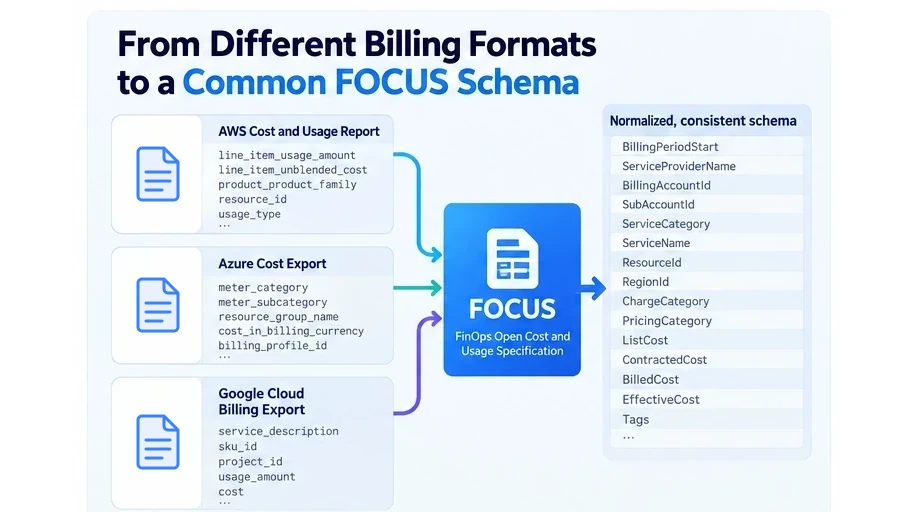
The FinOps Open Cost and Usage Specification, better known as FOCUS, addresses one of the least glamorous but most expensive problems in cloud financial management: every provider describes cost and usage differently.
AWS, Microsoft Azure, Google Cloud, SaaS vendors, and other technology providers all expose billing data, but historically they have used different field names, hierarchies, charge classifications, discount models, usage units, and approaches to amortization. A FinOps team trying to answer a seemingly simple question such as “How much did compute cost across all clouds last month?” often has to build and maintain a translation layer before it can even start the analysis.
FOCUS creates a common language for that translation.
The specification defines standardized datasets, column names, terminology, data types, and semantic rules for technology cost and usage data. Rather than writing separate reporting logic for every provider, teams can increasingly build queries around concepts such as BilledCost, EffectiveCost, ServiceCategory, ResourceId, and ChargeCategory.
That does not mean AWS Cost and Usage Reports, Azure cost exports, or Google Cloud billing exports suddenly become unnecessary.
The important distinction is this:
FOCUS standardizes the questions you can ask across providers. Native billing data still contains provider-specific context you may need to answer deeper questions inside a provider.
That distinction should shape how you design a modern FinOps data platform.
What Is the FinOps Open Cost and Usage Specification?
FOCUS is an open specification maintained as a community-driven project under the FinOps Foundation ecosystem. Its goal is to give producers and consumers of technology billing data a consistent schema and vocabulary.
The specification is not merely a list of renamed columns. It defines the meaning and expected behavior of those columns.
For example, FOCUS defines separate standardized cost perspectives including:
ListCostContractedCostBilledCostEffectiveCost
Those terms make it possible to distinguish public pricing, negotiated pricing, invoice impact, and economically recognized cost without learning a completely different vocabulary for each provider.
The current published specification is FOCUS 1.4, ratified on June 4, 2026. Version 1.4 expands the model beyond traditional cost-and-usage analysis, including additional capabilities for invoice reconciliation, billing periods, and contract commitments.
That does not mean every cloud provider currently exports FOCUS 1.4.
Implementation inevitably trails specification development. As of October 2026, AWS Data Exports supports FOCUS 1.2 with AWS columns as well as its earlier 1.0 format. Microsoft documents a FOCUS 1.2-preview Cost Management schema. Google Cloud's FOCUS BigQuery export is currently in Preview and includes FOCUS columns through version 1.2.
That version gap matters operationally. “We support FOCUS” is not yet enough information. A production data pipeline should also know which FOCUS version each dataset conforms to.
Why Cloud Billing Normalization Is Hard
At first glance, normalizing cloud billing looks like a column-renaming problem.
It is not.
Consider three providers exposing virtual machine spending. One provider may identify an account through an AWS account ID, another through an Azure subscription and billing profile, and another through a Google Cloud project tied to a billing account.
The underlying business question is similar:
Which organizational unit consumed this service and how much did it cost?
But the billing structures underneath that question are different.
Pricing creates another problem. A compute line item could represent:
- ordinary on-demand consumption,
- usage covered by a commitment,
- an upfront commitment purchase,
- unused committed capacity,
- a negotiated enterprise rate,
- a marketplace purchase,
- a credit,
- a refund,
- a tax,
- or a correction to an earlier billing period.
Simply putting all provider exports into one large table does not normalize those meanings.
FOCUS attempts to normalize the semantics, not just the syntax.
How FOCUS Normalizes Cost
One of the most useful parts of FOCUS is its standardized treatment of cost.
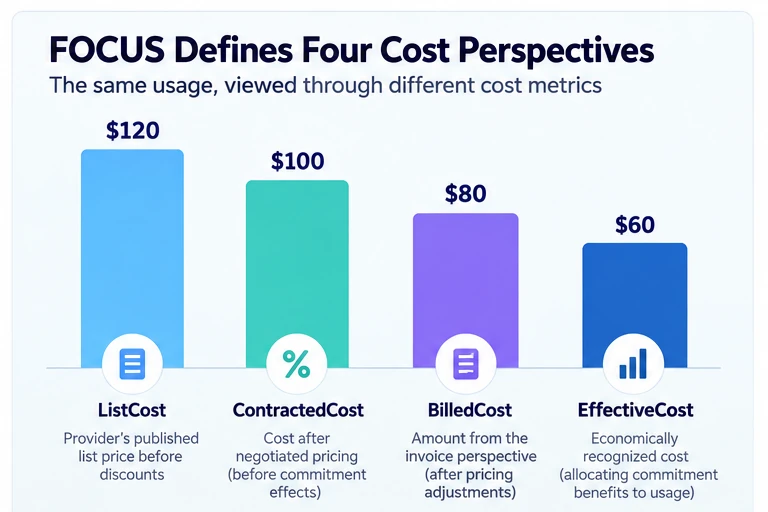
Example values. Whether BilledCost or EffectiveCost is higher depends on how and when commitments are paid.
ListCost
ListCost represents cost using the provider's published list price before discounts.
It provides a common baseline for understanding how much a service would have cost without negotiated pricing or commitment benefits. The specification defines it as a mandatory cost metric.
This makes cross-provider questions such as this practical:
SELECT
  ServiceProviderName,
  SUM(ListCost) AS list_cost
FROM focus_cost_usage
WHERE ChargeCategory = 'Usage'
  AND BillingPeriodStart >= DATE '2026-09-01'
  AND BillingPeriodStart < DATE '2026-10-01'
GROUP BY ServiceProviderName;
The ChargeCategory = 'Usage' filter keeps commitment purchases out of the sum, so they are not counted again beside the usage they cover.
The examples in this post use FOCUS 1.3 and later column names. ServiceProviderName replaced ProviderName in FOCUS 1.3, and 1.4 removed ProviderName. The provider exports named in this post (AWS FOCUS 1.2, Microsoft's 1.2 preview and Google's Preview export) still carry ProviderName, so map one to the other when you run these queries against them.
Without a standard, every provider requires different fields and pricing logic.
ContractedCost
ContractedCost represents the cost calculated using negotiated pricing before commitment-discount effects.
This distinction matters for enterprises with private pricing arrangements. Comparing ListCost with ContractedCost helps isolate savings attributable to commercial negotiation rather than infrastructure optimization or commitment usage.
BilledCost
BilledCost represents the amount attributable to the charge from the invoice perspective.
FOCUS describes this as the invoiced view of the charge, after relevant pricing adjustments but with specific rules around prepaid or commitment-covered usage.
This makes BilledCost useful for financial reporting and invoice-oriented analysis.
EffectiveCost
EffectiveCost approaches the same activity economically rather than strictly according to invoice timing.
For usage covered by an upfront or recurring commitment, FOCUS can recognize the applicable portion of that commitment against the consumption it supported. That makes EffectiveCost particularly useful for unit economics, workload allocation, engineering accountability, and amortized reporting.
FOCUS therefore gives teams four deliberately different views:
| Metric | Primary question |
|---|---|
ListCost | What would this have cost at list pricing? |
ContractedCost | What would it cost under our negotiated pricing? |
BilledCost | What cost is represented from the invoice perspective? |
EffectiveCost | What cost should be economically associated with the usage or commitment period? |
The distinction is especially important when commitment purchases and the usage they cover occur on different billing lines or at different times.
FOCUS explicitly supports comparison among these cost types so practitioners can distinguish negotiated savings, commitment benefits, billed amounts, and economically recognized cost.
How FOCUS Normalizes Cloud Dimensions
Cost metrics are only part of the problem.
FOCUS also establishes common dimensions that let teams group, filter, and allocate cloud spending consistently.
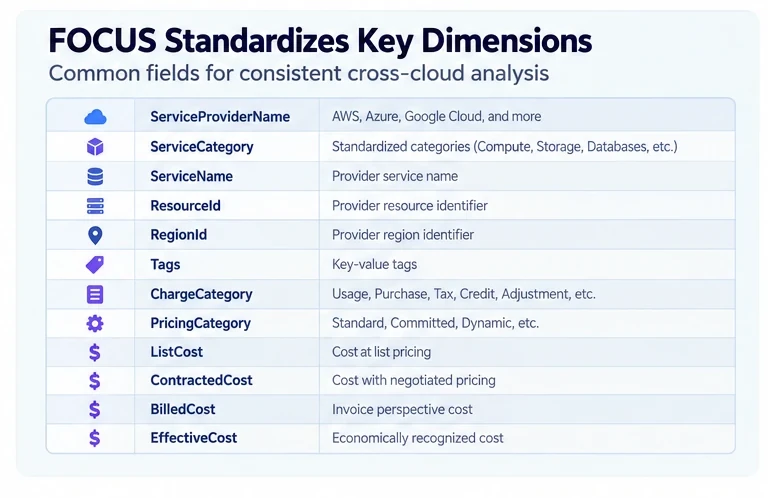
Examples include:
BillingAccountIdSubAccountIdServiceProviderNameServiceNameServiceCategoryResourceIdResourceNameRegionIdRegionNameAvailabilityZoneSkuIdSkuPriceIdTagsChargeCategoryPricingCategory
Instead of maintaining application logic that asks whether it is dealing with an AWS linked account, Azure subscription, or Google Cloud project, your normalized analytical layer can increasingly reason about a SubAccountId.
The provider-specific meaning still exists, but the query surface becomes much more consistent.
Service Categories Make Cross-Cloud Analysis More Useful
Cloud providers do not organize their product catalogs identically.
One provider's service names cannot always be directly compared with another provider's.
FOCUS addresses this with ServiceCategory, a standardized high-level classification based on the primary function of a service. The specification includes categories such as AI and Machine Learning, Analytics, Compute, Databases, Networking, Storage, and other functional groupings.
That allows a FinOps team to analyze spending using business-relevant categories instead of constructing a giant mapping table of product names.
A cross-cloud query can become:
SELECT
  ServiceProviderName,
  ServiceCategory,
  SUM(EffectiveCost) AS effective_cost
FROM focus_cost_usage
GROUP BY
  ServiceProviderName,
  ServiceCategory
ORDER BY effective_cost DESC;
This is where FOCUS becomes especially valuable.
The objective is not to pretend Amazon EC2, Azure Virtual Machines, and Google Compute Engine are the same product.
The objective is to let the organization reliably ask:
How much effective compute cost do we have by provider?
Then engineers can descend into provider-specific detail when necessary.
Charge Categories Normalize Why Money Appears on the Bill
A cloud billing row does not always represent resource consumption.
FOCUS's ChargeCategory standardizes the basic nature of a charge.
For example, the specification distinguishes usage, purchases, taxes, credits, and adjustments according to defined rules.
That seemingly simple classification has significant practical value.
Without it, a dashboard may accidentally treat a commitment purchase as ordinary compute usage, include a credit as negative infrastructure consumption, or combine tax with engineering-controlled spending.
With normalized charge semantics, common reporting logic becomes reusable across providers.
PricingCategory Helps Normalize Pricing Models
FOCUS also standardizes how a charge was priced through PricingCategory.
Among other cases, the specification differentiates standard pricing, committed pricing, dynamic pricing, and other models.
This makes it easier to answer questions such as:
- How much usage was priced through commitments?
- How much remained at standard pricing?
- Which workloads have low commitment coverage?
- How much cost is exposed to dynamic pricing?
Those questions previously required provider-specific billing logic.
FOCUS Does Not Eliminate Provider-Specific Detail
This is the most important limitation to understand.
FOCUS is designed to be extensible precisely because a common standard cannot encode every provider-specific billing concept.
Custom columns carry the x_ prefix, and FOCUS 1.4 formalizes how they are handled, separating the rules for custom columns from those for standard FOCUS columns. These fields allow a data generator to preserve information that is useful for analysis but does not belong in the standardized core schema.
In other words, provider-specific columns are not evidence that FOCUS failed.
They are part of the design.
AWS provides additional AWS-specific fields
AWS's FOCUS exports include provider-specific columns in addition to standard FOCUS columns.
Its FOCUS 1.0 format, for example, included fields such as:
x_CostCategoriesx_Discountsx_Operationx_ServiceCodex_UsageType
AWS explicitly describes these extensions as proprietary billing data that supports FinOps activities familiar to users of AWS Cost and Usage Reports.
AWS's newer FOCUS 1.2 table carries three AWS columns, x_Discounts, x_Operation and x_ServiceCode, and leaves out x_CostCategories and x_UsageType. The broader point remains: standardized cost fields do not remove the analytical value of AWS-native concepts.
Usage type, available as x_UsageType in the 1.0 table and in the Cost and Usage Report, can be extremely useful when investigating why a particular AWS service generated spend.
Azure retains extensive Microsoft-specific dimensions
Microsoft's FOCUS 1.2-preview schema demonstrates the same pattern even more clearly.
Alongside standard FOCUS fields, Azure exposes many custom columns such as:
x_BillingProfileIdx_CostAllocationRuleNamex_CostCenterx_InvoiceSectionIdx_ResourceGroupNamex_ServiceModelx_SkuMeterCategoryx_SkuMeterIdx_SkuMeterSubcategoryx_SkuOfferIdx_SkuRegion- billing-currency conversion fields
These fields describe Azure billing hierarchy, meter structure, cost allocation behavior, currency treatment, and commercial constructs that have no perfect one-to-one equivalent in every provider.
A FinOps team performing executive multi-cloud reporting may never need many of them.
A team debugging one specific Azure invoice probably will.
Google Cloud FOCUS maps back to detailed billing data
Google Cloud's FOCUS export follows the same general principle. Google states that the FOCUS columns generally map to fields from its Detailed usage cost export, including accounts, invoice dates, services, SKUs, projects, labels, locations, costs, usage, credits, adjustments, and granular resource-level details.
The FOCUS export gives teams a normalized analytical representation, while Google's native billing model still matters when investigating Google-specific behavior.
SKU Standardization Does Not Mean SKUs Become Portable
SkuId is a good example of where users can misunderstand normalization.
FOCUS standardizes the concept of a SKU identifier and defines requirements for how the field behaves.
It does not create one universal SKU catalog shared by AWS, Microsoft, and Google.
The specification explicitly treats SkuId as a service-provider-specified identifier.
That means this query is reasonable:
SELECT
  ServiceProviderName,
  SkuId,
  SUM(EffectiveCost)
FROM focus_cost_usage
GROUP BY ServiceProviderName, SkuId;
But this assumption is not:
The same
SkuIdmeans the same product across every cloud.
FOCUS standardizes the shape and meaning of the field, not the provider's product catalog.
The Same Principle Applies to Resources
A ResourceId means there is now a predictable field for a provider-assigned resource identifier.
It does not make AWS ARNs, Azure Resource Manager IDs, and Google Cloud resource identifiers structurally identical.
Likewise, RegionId creates a common place to store provider region identifiers. It does not imply that us-east-1, eastus, and us-east1 represent interchangeable infrastructure or have equivalent pricing, availability, latency, or regulatory properties.
Normalization removes unnecessary schema differences.
It should not erase real infrastructure differences.
FOCUS Version Support Is Another Provider-Specific Detail
A multi-cloud pipeline should not simply label data as “FOCUS.”
It should record the schema version.
That is particularly important in 2026 because the specification is evolving faster than every provider can implement it.
The latest standard is FOCUS 1.4, while major cloud exports currently center around 1.2 implementations or previews. AWS documents both 1.0 and 1.2 export tables. Microsoft exposes a 1.2-preview schema. Google Cloud's Preview FOCUS export currently includes columns through FOCUS 1.2.
This creates an architectural requirement:
Treat FOCUS version as data lineage, not documentation trivia.
If your normalized warehouse receives FOCUS 1.2 from one source while another future source emits 1.4, silently merging the datasets without schema-version awareness can produce incorrect assumptions about available fields and semantics.
Conformance Does Not Mean Every Field Is Perfectly Populated
Teams should also distinguish schema support from complete data coverage.
Some fields are mandatory. Others are conditional or recommended. Certain scenarios may legitimately result in null values.
Providers may also document conformance gaps.
Google, for example, publishes conformance-gap tables for its FOCUS export, listing the columns that do not yet meet every requirement of each FOCUS version. Those gaps reach the columns used in this post's examples: Google's export does not yet provide ServiceCategory or Tags, and does not emit the Purchase or Credit charge categories or the Dynamic pricing category. A cross-cloud report grouped by ServiceCategory therefore needs a mapping from Google's ServiceName until Google closes those gaps.
Your ingestion pipeline therefore needs data-quality tests even when the source advertises FOCUS compatibility.
Useful checks include:
- expected FOCUS version,
- required-column presence,
- unexpected null rates,
- accepted enum values,
- billing-currency consistency,
- duplicate detection,
- billing-period coverage,
- row corrections,
- cost reconciliation,
- and provider-specific conformance exceptions.
FOCUS reduces transformation complexity.
It does not eliminate data engineering.
When FOCUS Is Enough
For many FinOps activities, FOCUS should become the preferred analytical interface.
A normalized FOCUS layer is particularly useful for:
Executive multi-cloud reporting
Leadership generally needs spend by provider, service category, account, business unit, or time period.
Those are exactly the kinds of queries that benefit from standardized dimensions and metrics.
Showback and chargeback
FOCUS creates a more consistent foundation for mapping costs to teams, products, or departments across providers.
Your business-allocation logic can operate above the provider-specific ingestion layer instead of reimplementing its core semantics for every cloud.
Cost trend analysis
Queries based on BillingPeriodStart, ServiceProviderName, ServiceCategory, and standardized cost metrics can be shared across the sources that populate them.
FinOps tooling interoperability
A platform consuming FOCUS-compatible data does not need a bespoke base schema for every new provider.
Provider adapters still matter, but far less logic needs to be duplicated.
Commitment and pricing analysis
Standardized cost and pricing dimensions make it easier to compare list, contracted, billed, and effective cost perspectives across providers.
AI and automated analysis
A stable schema is especially valuable when analytics are consumed programmatically.
An AI system reasoning over EffectiveCost and ServiceCategory across providers has a much cleaner contract than one that must understand dozens of proprietary field names before answering a question.
When You Should Retain Native Cloud Exports
FOCUS should usually complement rather than immediately replace your native billing archive.
There are several situations where retaining native data is particularly important.
1. Deep provider-specific investigations
If an AWS networking charge suddenly increases, ServiceCategory = Networking gets you to the right area quickly.
Investigating the root cause may still require AWS usage type, operation, SKU, resource, or other provider-specific dimensions.
The normalized layer finds the problem.
The native layer helps explain it.
2. Invoice disputes and forensic analysis
If finance questions a specific invoice line, preserving the original provider representation gives you an immutable reference for the data as delivered.
A transformed dataset should never be your only historical evidence.
3. New provider features
Cloud providers constantly introduce pricing constructs faster than cross-industry standards can evolve.
A native export may expose a new field months before a corresponding concept is incorporated into FOCUS.
If you discarded the native data, you cannot retroactively enrich old records when your normalized model catches up.
4. Reprocessing after specification changes
Suppose your organization initially normalizes AWS CUR directly into a FOCUS 1.2-compatible warehouse.
Later, you want to adopt FOCUS 1.4 semantics.
If you retained the raw billing records, you can rebuild the transformation.
If you retained only the normalized output, information discarded during the original transformation may be unrecoverable.
5. Provider-specific optimization
Cross-cloud reporting may care about compute as a category.
Optimization cares about things such as exact instance families, commitment eligibility, meter details, operations, SKUs, network paths, storage classes, and provider-specific pricing mechanics.
That level of detail is where native exports often remain essential.
A Better Architecture: Raw, FOCUS, Business
Rather than choosing between FOCUS and native exports, design the FinOps data platform in layers.
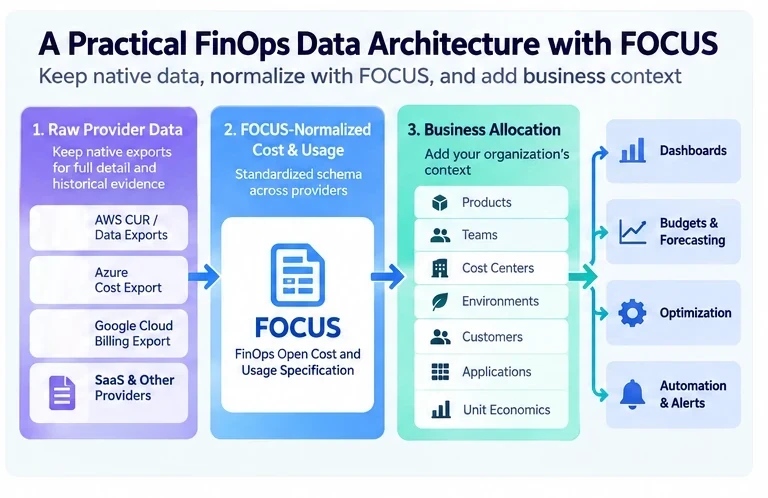
A practical architecture has three.
Layer 1: Raw provider data
Store native exports with minimal transformation.
Examples might include:
- AWS CUR 2.0 or Data Exports,
- Azure Cost Management exports,
- Google Cloud detailed billing exports,
- SaaS invoices or usage exports.
Preserve provider metadata, ingestion timestamps, source versions, and file lineage.
Think of this as your financial source archive.
Layer 2: FOCUS-normalized data
Transform or consume provider-supplied FOCUS datasets into a standardized analytical layer.
This layer should expose common concepts such as:
BillingPeriodStart
BillingPeriodEnd
ServiceProviderName
BillingAccountId
SubAccountId
ServiceCategory
ServiceName
ResourceId
RegionId
ChargeCategory
PricingCategory
ListCost
ContractedCost
BilledCost
EffectiveCost
Tags
This becomes the default interface for provider-independent analysis.
Layer 3: Business allocation
Cloud providers know about accounts, resources, services, projects, subscriptions, and tags.
Your company thinks about:
- products,
- customers,
- applications,
- teams,
- cost centers,
- environments,
- business units,
- and unit economics.
That business context belongs above the standardized billing layer.
A mature pipeline therefore looks like:
AWS CUR --------\
Azure Export ----> Raw Provider Layer
GCP Billing -----/

        ↓

FOCUS-normalized Cost & Usage

        ↓

Business allocation + ownership + unit economics

        ↓

Dashboards / budgets / forecasting / optimization / automation
FOCUS becomes the stable contract in the middle.
That is a more durable role than trying to use it as the only dataset your organization retains.
Do Not Throw Away Custom x_ Columns
When designing your warehouse, it is tempting to ingest only official standardized columns.
That defeats part of FOCUS's extensibility model.
The specification deliberately supports x_ custom columns because some provider-specific information remains operationally important.
A better approach is to separate them logically.
For example:
focus_core.*
provider_extensions.*
or maintain the full FOCUS export while building views that expose only standardized fields for portable queries.
That gives analysts a clean cross-cloud surface without permanently discarding detail.
Validate FOCUS Against the Native Bill Before Trusting It
Migrating to FOCUS should include reconciliation.
For each provider and billing period, compare the normalized dataset against the trusted source.
At minimum, verify totals for:
- billed cost,
- effective or amortized cost where applicable,
- credits,
- refunds,
- taxes,
- purchases,
- usage,
- provider accounts,
- and currencies.
Then investigate differences rather than assuming the normalized result is automatically correct.
Also account for late-arriving billing data and corrections.
The purpose of the exercise is not to prove that every dataset has the same row count. Transformation and amortization can legitimately change representation.
The goal is to understand why totals differ and whether those differences are expected.
FOCUS Is Most Valuable When Queries Become Portable
The real success metric for FOCUS is not how many columns you mapped.
It is how much provider-specific logic disappears from the analytical layer.
Imagine an organization with AWS and Google Cloud.
Before normalization, a service-cost report might contain separate query paths:
if provider == AWS:
    use AWS-specific service and cost fields
elif provider == GCP:
    use GCP-specific service and cost fields
With FOCUS, much of the report can instead work from:
SELECT
  ServiceProviderName,
  ServiceCategory,
  ServiceName,
  SUM(EffectiveCost) AS effective_cost
FROM focus_cost_usage
WHERE ChargeCategory = 'Usage'
GROUP BY
  ServiceProviderName,
  ServiceCategory,
  ServiceName
ORDER BY effective_cost DESC;
That is the value of normalization.
The query becomes portable even though the infrastructure underneath it remains different. For Google Cloud rows, that holds once ServiceCategory is populated, which Google's export does not yet do.
Where GetFinOps Fits
A multi-cloud FinOps product ultimately has to solve the same problem FOCUS addresses: users should not need to switch mental models every time they move between providers.
GetFinOps' multi-cloud cost view presents AWS and Google Cloud cost on one surface, split by account. It reads AWS cost from Cost Explorer and Google Cloud cost from the BigQuery billing export. The two are not yet on one charge basis: AWS figures leave out tax, credits, refunds and bundled discounts by default, while Google Cloud figures sum the billing export's cost column, so Google Cloud credits are not subtracted. AWS-specific capabilities, such as native forecasting and selectable unblended or amortized cost views, remain provider-aware rather than being forced into a false cross-cloud equivalence.
That is the broader principle FinOps teams should carry into their own architectures:
Normalize what is genuinely common. Preserve what is genuinely different.
FOCUS provides an increasingly strong open standard for the first half of that equation.
Native provider data still matters for the second.
Frequently Asked Questions
Is FOCUS intended to replace AWS CUR?
Not necessarily.
AWS offers provider-generated FOCUS exports, including FOCUS 1.2 with AWS-specific columns, while CUR 2.0 remains AWS's detailed native cost-and-usage table, with up to 125 columns and optional resource-level and split cost allocation data.
FOCUS is often the better interface for portable analytics. CUR can remain valuable for AWS-specific analysis, historical continuity, and fields that are not represented in the standardized schema.
Does FOCUS make AWS, Azure, and GCP billing identical?
No.
It standardizes a common set of concepts and semantics.
Provider-specific service catalogs, resource identifiers, commercial structures, SKUs, operations, billing hierarchies, and other details still differ.
That difference is expected.
What is the latest FOCUS version?
FOCUS 1.4 is the latest published specification as of October 2026. It was ratified on June 4, 2026.
Provider implementations may support earlier versions, so always check the version generated by the specific service you consume.
Does AWS support FOCUS?
Yes.
AWS Data Exports currently offers both FOCUS 1.0 and FOCUS 1.2 tables with AWS-specific columns.
Does Azure support FOCUS?
Yes.
Microsoft Cost Management provides FOCUS-formatted cost and usage exports and currently documents a FOCUS 1.2-preview schema containing both standardized and Microsoft-specific fields.
Does Google Cloud support FOCUS?
Yes, currently through a Preview Cloud Billing export to BigQuery.
Google announced the Preview in June 2026 and states that its export includes FOCUS columns through version 1.2.
Should I store only FOCUS data?
For most organizations, retaining the native billing source alongside the standardized analytical layer is safer.
The native dataset provides reprocessing capability, forensic evidence, provider-specific dimensions, and protection against information loss as the FOCUS specification evolves.
FOCUS should become your common analytical interface without necessarily becoming your only historical source.
The Practical Rule: Normalize Without Destroying Information
The FinOps Open Cost and Usage Specification is one of the most important developments in cloud financial data because it attacks an expensive problem at the correct layer.
It does not attempt to make every cloud identical.
It creates a shared vocabulary for the parts that should be consistent.
BilledCost can mean the same kind of thing regardless of where the charge originated. EffectiveCost can support comparable economic reporting. ServiceCategory can organize technology spending into common functional groups. ChargeCategory can distinguish usage from purchases, credits, taxes, and other billing events without every organization inventing its own taxonomy.
That reduces pipeline complexity, improves interoperability, and lets FinOps practitioners spend less time translating billing schemas.
But standardization has a boundary.
An AWS usage type may still matter. An Azure meter may still matter. A Google Cloud project hierarchy may still matter. A provider-specific marketplace or commitment construct may contain information no common field fully captures.
That is why the strongest architecture is not:
Native billing or FOCUS.
It is:
Native billing → FOCUS normalization → business context.
Keep the original evidence. Normalize the concepts that can be standardized. Add your organization's ownership and allocation model above them.
Then use the normalized layer for the thing FOCUS is designed to make easier: asking consistent FinOps questions across increasingly complex technology environments.
Managing AWS and Google Cloud side by side? Explore GetFinOps multi-cloud cost management to see both clouds' cost in one view, with AWS-native forecasting and cost metrics kept intact.
Sources
- Introducing FOCUS 1.4 (FinOps Foundation) · finops.org
- FOCUS specification · focus.finops.org
- AWS: FOCUS 1.2 with AWS columns · docs.aws.amazon.com
- AWS: FOCUS 1.0 with AWS columns · docs.aws.amazon.com
- AWS: Cost and Usage Report 2.0 · docs.aws.amazon.com
- Microsoft Cost Management: FOCUS cost and usage details schema · learn.microsoft.com
- Google Cloud: Structure of FOCUS data export · docs.cloud.google.com
- Google Cloud Billing release notes · docs.cloud.google.com
- FOCUS 1.3: ServiceProviderName · focus.finops.org