Bedrock Batch Inference Cost: When Batch Makes Sense
See when Bedrock batch inference lowers total cost by weighing model rates, deadlines, retries, eligibility, and operating effort against online serving.
· 9 min read

A sudden spike in generative AI spend often triggers a reactive hunt for cheaper infrastructure. When an anomaly flag highlights high token usage, the immediate response is usually to check the model tier, and Amazon Bedrock offers a batch inference mode that processes large groups of prompts at a discount compared to standard online serving. While switching to that mode might look like a direct path to lower bills, the transition requires careful planning.
Moving from a synchronous API call to an asynchronous pipeline changes how your application handles data, manages errors, and delivers answers to users. Before changing the architecture, apply a controlled financial operations loop. Identify the spend, ask the workload owner which jobs can tolerate a delay, and review any resulting AWS remediation against account-level safety controls.
FinOps AI supports this loop by bringing AWS and Google Cloud spend, Kubernetes, Bedrock and Vertex AI costs, and SaaS subscriptions into one workspace. When one model's daily Bedrock spend jumps well above its seven-day average, FinOps AI raises a finding. It has no action that changes a Bedrock workload, so moving work to batch stays with the team that owns it. The changes it can make are AWS resource changes, such as stopping an idle instance. Each waits for approval unless you have turned on automatic execution for that reversible action type, runs under the account's safety rules, is recorded in an audit trail, and is rolled back if it is reversible and its post-check fails. Google Cloud is covered for cost and usage, without remediation.
Keep the boundary between infrastructure governance and application architecture explicit. FinOps AI provides the shared view, budgets and AWS cost forecasts, leaving the application or pipeline team to decide whether a specific workload can adopt an asynchronous pattern. The platform does not create Bedrock batch jobs, rewrite your application code, or automatically convert online traffic into batch submissions.
Compare Model Rates With Total Cost per Usable Result
Evaluating your Bedrock batch inference cost means looking past the raw token rate to calculate the total operational expense of an asynchronous workflow. The headline pricing often drives the initial interest, but the realized savings depend entirely on the specific model, the Region, and the inference tier you currently use.
Start with the exact model rates rather than a generic assumption about batch discounts. The Amazon Bedrock pricing page shows Standard, Priority and Flex on-demand tiers and, for select models, a separate Batch price, usually 50% below Standard. Flex carries the same 50% discount on the synchronous API, so check whether Flex already gives your model the batch price without a job pipeline before you build one.
Calculate the baseline token charge using the specific input and output rates for your target model. The formula requires dividing your total tokens by one million and multiplying by the published rate:
(input tokens ÷ 1,000,000 × input rate) + (output tokens ÷ 1,000,000 × output rate)
For most models with a batch price, the same tokens cost about half as much in batch as in Standard; check your model's batch rate, since a few are discounted less (Amazon Nova Multimodal Embeddings, for example, takes only 20% off audio, video and document-image input). Batch jobs cannot use prompt caching, though, so a workload that already pays cache-read rates online will save less, and can pay more. Net savings are lower again once you account for batch infrastructure and operational overhead.
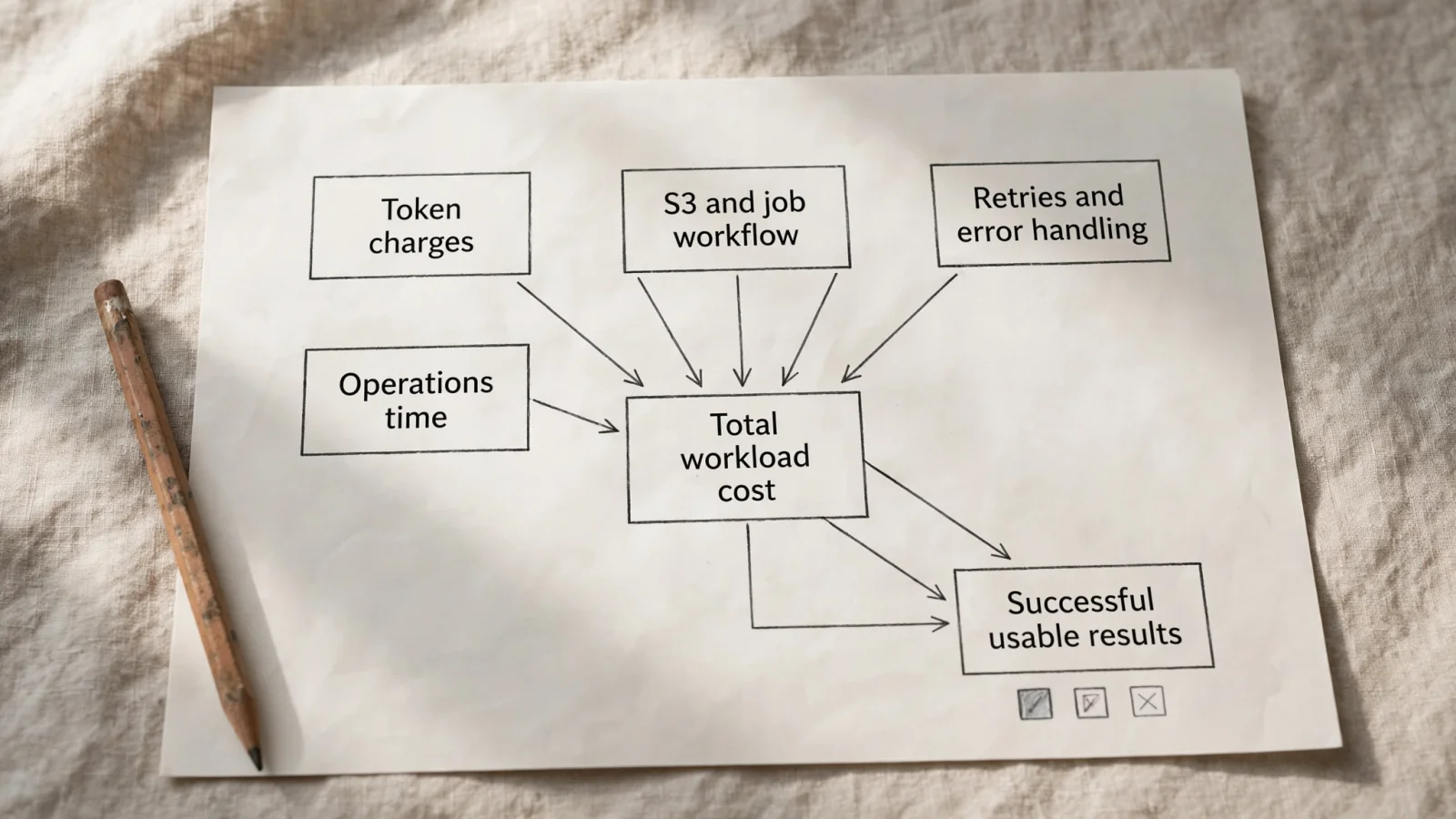
To find the true financial impact, compare the end-to-end workload costs. The batch total includes the token charges, the attributable Amazon S3 storage costs for the input and output files, the job-workflow orchestration expenses, the cost of handling errors, and the allocated engineering time required to maintain the pipeline. The online total includes the token charges, the serving and orchestration costs, immediate retry execution, and the allocated operational time. Treat storage, workflow orchestration, and staff time as workload-specific costs rather than universal Bedrock fees.
Use those totals to calculate the effective cost per successful usable result. Divide the total workload cost by the number of successful usable results the pipeline produces. This metric exposes the true cost of failed records and reprocessing, which keeps those expenses from hiding inside a low average cost per submitted prompt. In FinOps AI, Bedrock spend appears by model, and the cost allocation view groups spend by the Owner, Environment and CostCenter tags once they are activated as cost allocation tags in AWS Billing, so tag the S3 buckets and orchestration functions with them to see them beside the token charges. Budgets can cover the whole workspace, one service or one cloud provider, but not a tag.
Check the Deadline and Workload Shape
Batch inference operates asynchronously. Instead of opening a connection and waiting for the model to stream a response, you prepare your prompts as a JSONL file, upload that file to an S3 bucket, and submit a job definition to Bedrock. The service places your job in a queue, processes the records, and eventually writes an output file back to S3.
This architecture makes batch a strong fit for non-time-sensitive workloads. The AWS Well-Architected Agentic AI Lens identifies report generation, data enrichment, and offline evaluation as candidates. For example, an application could use batch inference to generate weekly summaries of customer interactions when the exact completion time is not important.
Online serving fits workloads where the caller requires an immediate answer during the request. A customer-facing chatbot, a live code assistant, or a real-time fraud detection prompt cannot wait for an S3 upload, a queue delay, and a batch download. If the user interface blocks while waiting for the model, the workload requires the online path.
Test the deadline tolerance practically. Compare the strict business completion window with the observed end-to-end time for a representative batch run. That duration must include the input preparation, the S3 upload, the queue wait time, the job execution, the output retrieval, the error parsing, and any required reprocessing. The optional timeoutDurationInHours setting (24 to 168 hours) caps how long a job may wait and run: a job that has not started by then ends as Expired, and one that runs out of time while processing ends as PartiallyCompleted, with the remaining records unprocessed. It is a ceiling, not a promise that the job will meet your business deadline.
Confirm Model, Region, and Request Compatibility
A lower token rate only matters if the infrastructure accepts your request. Treat workload eligibility as a preflight criterion rather than an assumption based on your current online configuration, because a model available for synchronous calls in your preferred geographic location might lack asynchronous support entirely.
Check your specific requirements against the supported Regions and models for batch inference list. It lists batch support by model and Region separately from general model and Region references, so verify the exact model identifier and Region combination before writing pipeline code.
Review the data-format and job-size quotas next. By default a job needs at least 100 records and accepts up to 100,000 records, 1 GB per input file and 5 GB per job for most models (100 GB for Amazon Nova Lite, Nova Pro and Nova Multimodal Embeddings). The record maximum can be raised; the minimum cannot. A job below the minimum fails validation. These quotas make small, irregular or continuous micro-batch workloads impractical: at five prompts an hour, filling one job takes 20 hours before it even reaches the queue.
Pay close attention to API compatibility, particularly regarding tool calling and custom model configurations. AWS documents that batch inference does not support provisioned models. If your workload relies on a provisioned throughput commitment for performance stability, you cannot route that traffic through the batch API, and because Provisioned Throughput bills per hour whether used or not, moving its traffic to batch only saves money if you also shrink the commitment.
Tool calling requires specific request formatting in an asynchronous context. Applications cannot use tool calling for batch jobs if they rely on the Converse invocation type and the records contain toolConfig. Records formatted that way will fail. Instead, you must use the InvokeModel API path and rely on the model's native request format to execute tool calling in a batch job. Incompatibility at the API level or the need for extensive pipeline rewrites can outweigh the financial benefit of a lower token rate.
Count Failures, Retries, and Operating Effort
Job completion and record-level success are distinct metrics. When a synchronous API call fails, the calling application receives an error code immediately and can retry the prompt based on a backoff strategy. A batch job can report Completed while individual records failed: check errorRecordCount in the manifest, and treat a PartiallyCompleted job as one whose remaining records never ran.
AWS documentation outlines how to view the results of a batch inference job by inspecting the output manifest and result files in your S3 bucket. The manifest reports the total success and error counts alongside the input and output token counts. For a failed record, the output file contains an error object with an error code and message in place of modelOutput, so inspect that object for the recorded failure details.
Output order in the destination file is not guaranteed to match the input order in the source file. Your application must retain or use the recordId field to associate the output results with the original source records. A fragile parsing script that relies on line numbers will assign the wrong generated text to the wrong database entry.
Build your pipeline to inspect failures and selectively reprocess the appropriate records. Blindly rerunning the entire job because ten prompts failed wastes tokens and inflates the total workload cost. Your reprocessing logic needs to distinguish between transient failures that warrant a retry and permanent failures, like an oversized prompt, that will fail every time.
Include the retry token charges, the processing delay, and the engineering effort required to manage these jobs in your calculation of the cost per usable result. Monitoring also requires setup effort. Rather than writing scripts to poll the Bedrock API continuously, configure EventBridge completion notifications and track the progress counters. Building, maintaining, and monitoring this architecture consumes platform engineering hours that add a distinct financial cost to your pipeline.
Apply the Criteria in a Measured Pilot
Choosing between online and batch inference requires balancing the financial discount against the architectural complexity. A simple checklist helps platform teams evaluate candidate workloads without spending weeks on speculative engineering.
| Decision Factor | Prioritize Batch Inference When... | Prioritize Online Serving When... |
|---|---|---|
| Deadline | Results can arrive asynchronously within a defined, flexible processing window. | The caller, user, or downstream system needs an answer during the immediate request. |
| Workload shape | The work consists of a large, prepared set of independent prompts formatted together. | Work arrives in a live interaction, relies on continuous chat history, or requires an immediate response to proceed. |
| Economics | The selected model has batch pricing, and the lower token charge exceeds the batch-specific overhead. | The existing online tier is already competitively priced, or the job handling and storage costs erase the rate difference. |
| Reliability and rework | The platform team can inspect record-level errors and retry appropriate records without blocking operations. | A failed or delayed asynchronous job would block a user-facing flow or miss a business-critical daily deadline. |
| Model and API fit | The exact foundation model, Region, and request format are fully supported for asynchronous jobs. | The application relies on provisioned throughput, unsupported API features, or a configuration that requires a massive code rewrite. |
Batch is a strong candidate when you have independent, prepared prompts that can finish asynchronously within a flexible window. The economics make sense when the exact model and request format are supported, and the measured cost per usable result remains lower even after accounting for S3 storage and job orchestration.
Online serving is the correct choice when a caller needs an immediate answer. It also remains the better financial and operational choice when the batch workflow is incompatible with your API requirements, when your existing online tier already matches the batch discount, or when the risk of delay and rework erases the expected savings.
Run a representative pilot before migrating an entire workload. Use your team's typical token mix and apply your output-acceptance criteria. Record the end-to-end duration, the number of successful usable results, the specific errors encountered, the volume of retries, the workflow infrastructure costs, and the operating time to compare those totals against your existing online serving metrics.
Return to your FinOps practice once the pilot concludes. Use your shared cloud-cost visibility tools to track the financial outcome and ensure the S3 storage and orchestration functions receive the correct allocation tags. Keep your application team's architecture decisions distinct from your infrastructure governance. When you do find infrastructure waste that requires an AWS resource change, route it through an approval-gated workflow, check the result, and roll back a reversible change if the check fails. That measured approach keeps your AI costs managed and your production pipelines secure.
Ready to manage your AI infrastructure costs with approval-gated workflows? See how FinOps AI brings AWS, Google Cloud, Bedrock, and Kubernetes spend into one clear view. Visit FinOps AI to start optimizing safely.
Sources
- Amazon Bedrock pricing · aws.amazon.com
- AWS Well-Architected Agentic AI Lens · docs.aws.amazon.com
- supported Regions and models for batch inference · docs.aws.amazon.com
- view the results of a batch inference job · docs.aws.amazon.com